DeprecationReportBody
Limited availability
This feature is not Baseline because it does not work in some of the most widely-used browsers.
Note: This feature is available in Web Workers.
Deprecated: This feature is no longer recommended. Though some browsers might still support it, it may have already been removed from the relevant web standards, may be in the process of being dropped, or may only be kept for compatibility purposes. Avoid using it, and update existing code if possible; see the compatibility table at the bottom of this page to guide your decision. Be aware that this feature may cease to work at any time.
The DeprecationReportBody interface of the Reporting API represents the body of a deprecation report.
A deprecation report is generated when a deprecated feature (for example a deprecated API method) is used on a document being observed by a ReportingObserver. In addition to the support of this API, receiving useful deprecation warnings relies on browser vendors adding these warnings for deprecated features.
Constructor
An instance of DeprecationReportBody is returned as the value of Report.body when Report.Type is deprecation. The interface has no constructor.
Instance properties
This interface also inherits properties from ReportBody.
DeprecationReportBody.idDeprecated-
A string representing the feature or API that is deprecated, for example
NavigatorGetUserMedia. This can be used to group reports by deprecated feature. DeprecationReportBody.anticipatedRemovalDeprecated-
A
Dateobject (rendered as a string) representing the date when the feature is expected to be removed from the current browser. If the date is not known, this property will returnnull. DeprecationReportBody.messageDeprecated-
A string containing a human-readable description of the deprecation, including information such as what newer feature has superseded it, if any. This typically matches the message a browser will display in its DevTools console when a deprecated feature is used, if one is available.
DeprecationReportBody.sourceFileDeprecated-
A string containing the path to the source file where the deprecated feature was used, if known, or
nullotherwise. DeprecationReportBody.lineNumberDeprecated-
A number representing the line in the source file in which the deprecated feature was used, if known, or
nullotherwise. DeprecationReportBody.columnNumberDeprecated-
A number representing the column in the source file in which the deprecated feature was used, if known, or
nullotherwise.
Instance methods
This interface also inherits methods from ReportBody.
DeprecationReportBody.toJSON()Deprecated-
A serializer which returns a JSON representation of the
InterventionReportBodyobject.
Examples
In our deprecation_report.html example, we create a simple reporting observer to observe usage of deprecated features on our web page:
const options = {
  types: ["deprecation"],
  buffered: true,
};

const observer = new ReportingObserver((reports, observer) => {
  reportBtn.onclick = () => displayReports(reports);
}, options);
We then tell it to start observing reports using ReportingObserver.observe(); this tells the observer to start collecting reports in its report queue, and runs the callback function specified inside the constructor:
observer.observe();
Because of the event handler we set up inside the ReportingObserver() constructor, we can now click the button to display the report details.
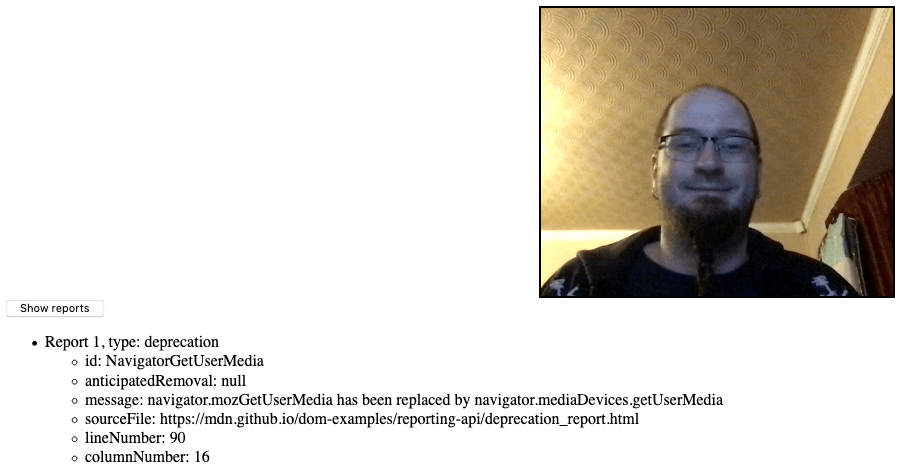
The report details are displayed via the displayReports() function, which takes the observer callback's reports parameter as its parameter:
function displayReports(reports) {
  const outputElem = document.querySelector(".output");
  const list = document.createElement("ul");
  outputElem.appendChild(list);

  reports.forEach((report, i) => {
    const listItem = document.createElement("li");
    const textNode = document.createTextNode(
      `Report ${i + 1}, type: ${report.type}`,
    );
    listItem.appendChild(textNode);
    const innerList = document.createElement("ul");
    listItem.appendChild(innerList);
    list.appendChild(listItem);

    for (const [key, value] of Object.entries(report.body)) {
      const innerListItem = document.createElement("li");
      innerListItem.textContent = `${key}: ${value}`;
      innerList.appendChild(innerListItem);
    }
  });
}
The reports parameter contains an array of all the reports in the observer's report queue. We loop over each report using a basic for loop, then iterate over each entry of in the report's body (a DeprecationReportBody instance) using a for...in structure, displaying each key/value pair inside a list item.
Specifications
| Specification |
|---|
| Deprecation Reporting # deprecationreportbody |